
Loading...


This article contains subjective opinions and claims.
NotebookLM might be the most underrated and underused tool in AI right now.
The point of this guide is to help you, if you haven't tried NotebookLM yet, or if you've only poked at it casually (like I did at first), with:
Understanding what the tool is actually built for
When to reach for it, and what for
Using it in a tidy, sensible way
A lot of people know NotebookLM as "the thing that turns text into a podcast". That's just the tip of the iceberg. NotebookLM has a pile of other uses that make it one of the most genuinely useful tools out there.
The guide has 5 parts:
What is NotebookLM and how is it structured?
What can you use NotebookLM for?
How do you use it well?
What sets NotebookLM apart from other AI tools?
The most important tips, in short.
NotebookLM is Google's AI tool for research, knowledge work, and content production. Think of it as an AI workspace for a project, topic, or subject area. Not primarily a place to store files, but a place to actively work with the content you already have.
Once you add your sources, NotebookLM can help you spot patterns, links, and connections across the material. You can use it to dig deeper, compare perspectives, ask questions, and notice things you might have missed on your own.
That makes it especially useful when you have several sources you want to understand and process over time, for example in a project, a research effort, or a subject you want to go deep on.
On top of that, NotebookLM can turn your material into new and more engaging formats: presentations, audio summaries, mind maps, infographics, flashcards, and more.
Use NotebookLM when you want to actually work with a body of material over time, not just when you have a single quick question.
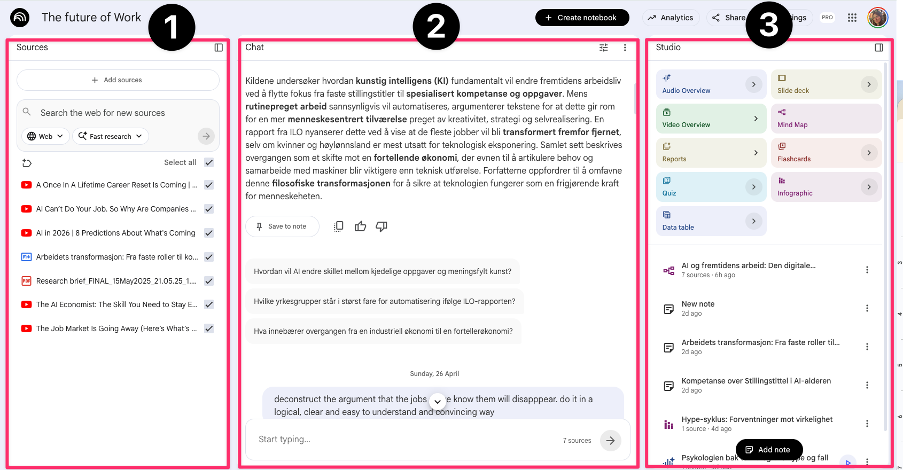
Sources, in the left panel. Sources are the core content of your notebook, and they're what every chat conversation and every Studio output is built from.
Chat, in the middle. This is where you talk to the AI about the material in your sources and ask detailed questions.
Studio, in the right panel. This is the "production area", where you create things based on your sources.
Do you use Google at work? Then you can use NotebookLM to organise your projects and use AI as a sparring partner. Add the relevant sources, and use NotebookLM to work through the information, dig into the content, get more insight, and surface connections.
Set up notebooks for topics you want to understand better. Drop in articles, videos, and other content you already have on your reading or watch list, and use NotebookLM to explore the sources, build mind maps, and approach the topic from different angles. You can also generate and read through reports and visual presentations, and add your own notes and reflections to the notebook.
Sign in or create a free account to continue.
No trial, no credit card, no mandatory newsletter.
