
Loading...

Most people use Claude like a slightly better Google. Here's what you're missing.
Most people who use Claude today ask a question, get an answer, and move on. Maybe they want help writing an email, explaining a concept, or summarising a document. That works fine. But it's a bit like buying a Swiss Army knife and only ever using the bottle opener.
Claude has grown from a chatbot into a platform with tools most people don't know exist. Projects, Artifacts, Skills, and Cowork are four features that change how you work. Not through better prompts, but through better systems.
This article walks you through the progression from regular chat to something that looks more like a working partner.
There's a big gap between using Claude only for Q&A in the chat and doing something more with it. And it doesn't take more than a couple of hours to become a power user.
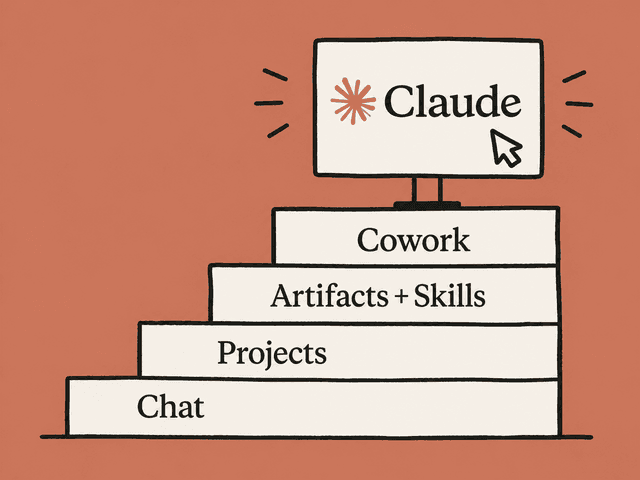
The progression looks roughly like this:
Level 1 - Chat. You type a question, you get an answer. Maybe you've got a Notion page with good prompts you paste in. Every conversation starts from zero. Claude knows nothing about who you are or what you're working on.
Level 2 - Projects. You give Claude lasting context, split across separate workspaces. Who you are, what you're working on, how you want things done for that specific area. Claude remembers between conversations. You don't have to explain from scratch every time.
Level 3 - Artifacts and Skills. You ask for things, not just text. Dashboards, calculators, prototypes. You teach Claude with Skills so it does tasks correctly every time without you having to repeat yourself.
Level 4 - Cowork. You delegate. Claude works on your files independently, builds reports, organises documents. You describe the result you want and do something else while Claude works.
Before you move on to the advanced features, it's worth getting better at the basics. Six things that make an immediate difference:
1. Give context, not just questions. "Write an email" gets you a generic email. "Write an email to the CFO about revenue dropping 12% this month, tone should be direct but constructive, and suggest three actions" gets you something you can actually use.
2. Ask Claude to ask you questions first. Type "ask me questions before you start." Claude will then clarify things you hadn't considered, and the result gets better.
3. Iterate instead of starting over. The first answer is rarely perfect. Say "make this shorter", "more concrete" or "focus more on point 2." Most people give up after the first attempt. Power users iterate 3-5 times.
4. Ask for the numbers behind the conclusions. Claude tends to give general summaries. Say "show me the numbers behind the conclusion" and you get substance instead of talk when you're doing analysis.
5. Tell Claude to be critical. Claude is naturally polite and agreeable. Say "challenge my reasoning" or "what are the weaknesses here?" if you want honest answers.
6. Turn on Extended Thinking. For complex tasks you can ask Claude to think step by step. It takes a bit longer, but the quality of analysis, strategy, and problem solving gets noticeably better. We recommend keeping Extended Thinking on by default.
Sign in or create a free account to continue.
No trial, no credit card, no mandatory newsletter.


