
Loading...

Microsoft markets Copilot Cowork on the promise that it will carry out tasks for you. Is that true, what can Cowork do that regular Copilot can't, and when should you actually reach for it? This article answers those questions.
What is Copilot Cowork compared to regular Chat? The simplest way to put it: regular Copilot helps you make or do one thing at a time. Cowork does a whole job for you, handles tasks that run over several steps, and has permission to do more inside your apps. Chat answers, drafts, summarises, and can handle simple tasks, but it struggles as soon as you ask for a lot at once. Cowork takes a goal, makes a plan, and works through it over many steps across Outlook, Teams, SharePoint and more, far more independently than regular Copilot. It still has plenty of limitations, though.
This article will give you a sense of what Cowork can do, when it's worth using, and what separates Copilot Cowork from Claude Cowork, the other big agent on the market. At the end you get a concrete workaround for the weakness that annoys most: Cowork forgets who you are every time you start a new conversation.
One thing worth knowing up front: when Copilot Cowork first launched, it ran only on Anthropic's models (Claude). Unlike OpenAI's (ChatGPT) models, those are processed in the US, which has kept a lot of European companies from using Cowork at all. Now that Copilot Cowork is generally available, OpenAI models are supported too, but at the time of writing there is a real quality difference you should be aware of (more on that later). That will probably even out; things are moving fast.
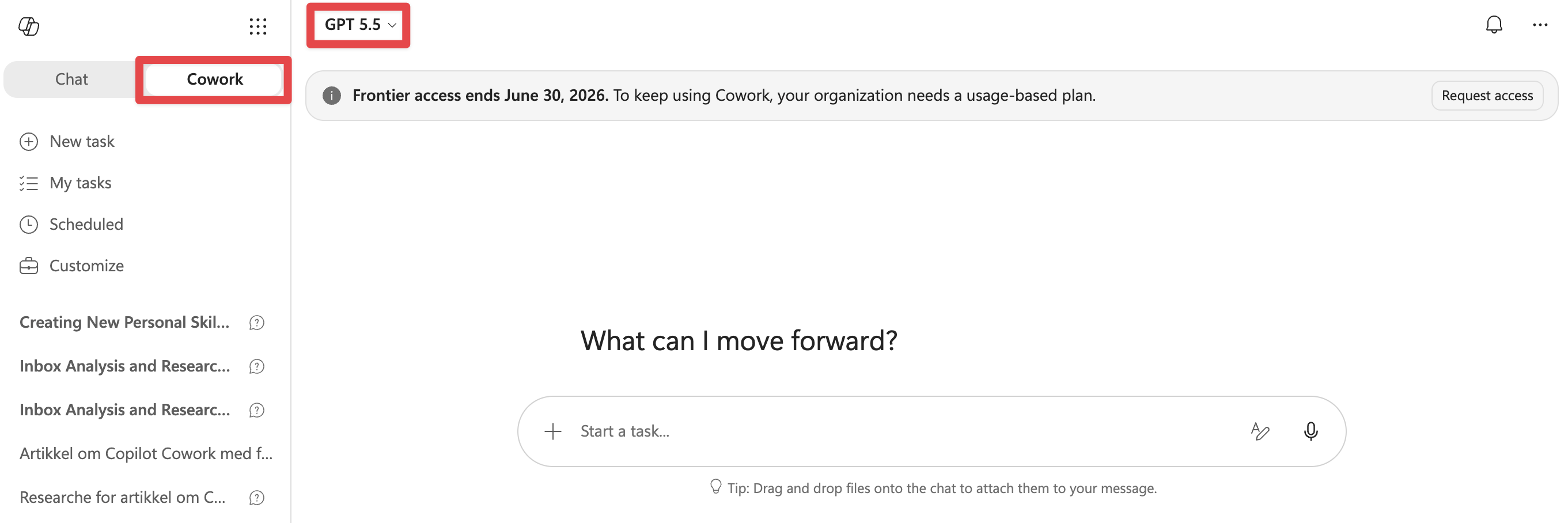
You'll find Cowork as an option next to Chat once you're logged into Copilot. The model picker sits here too. If you have access to Claude Opus, I'd pick that over GPT. The GPT models work fine, but Claude Opus works better, so go with it if you can.
Microsoft markets Copilot Cowork on the fact that it can carry out tasks for you, and presents that as the big difference from regular chat. Cowork can do tasks for you, that part is true, but so can regular Copilot, just not to the same degree. Here are some examples:
| Copilot Chat | Copilot Cowork | |
|---|---|---|
| Send email | Can create a draft, but you have to click send | Can create a draft and send it directly |
| Create calendar entries | Yes | Yes |
| Edit calendar entries | No | Yes |
| Send messages in Teams | No | Yes |
| Create files (pptx, xlsx etc.) | Yes | Yes |
| Save files to OneDrive | Yes, to one specific folder | Yes, to one specific folder |
| Edit files (pptx, xlsx etc.) | No | Only files Cowork created itself |
| Run tasks in parallel | No | Yes |
So it isn't black and white when you should pick Cowork over regular Chat. What sets Cowork apart most is that while regular Chat mostly does one thing at a time, Cowork can work through several steps in order and run tasks in parallel. That makes it far stronger as an agentic assistant for big, complicated jobs, but for small one-off tasks Cowork is overkill and regular chat does the job just as well.
Cowork differs most in these areas:
It can make a plan and work through several steps without losing the thread
It can work on several tasks in parallel (subagents)
It saves files straight to your OneDrive
You can use Skills
This is probably Copilot Cowork's strongest card. Here's an example of what that can look like: pull next week's calendar entries, work out what needs preparation, do separate research for the relevant entries, analyse relevant files from OneDrive/SharePoint, write a summary and meeting prep for each meeting, draft any emails that need to go out beforehand, and post a summary in Teams.
That was a mouthful, but it's a good example of what Cowork manages and regular Copilot has no chance of doing in one round. Which means Cowork is best suited to jobs that are genuinely big, and ideally repetitive.
Copilot Cowork can spin up subagents that handle sub-tasks. That sounds cool, and there are some real advantages to it, plus one drawback.
One advantage is that a new subagent means a new context window. If you're running a big Excel analysis or deep research, that burns a lot of tokens and fills up the context window. If a subagent does the work instead, it gets a temporary context window, does the job, and hands the summary back to the "main agent". That saves time when several subagents run in parallel, and it leaves the main agent with more of its own context window intact.
Sign in or create a free account to continue.
No trial, no credit card, no mandatory newsletter.
